XAUUSD / GOLD · METATRADER 5

Gold Snap.
Gold breakouts.
Automated.

Put a focused gold breakout strategy to work in MetaTrader 5. Gold Snap combines XAUUSD entries with adaptive stops, targets and trailing management — without grid or martingale.

See the free-demo steps → · Strategy Tester only

Developer-published product guide. Trading involves risk, including loss of capital.

01 / THE STRATEGY

Built around gold. Managed automatically.

01 — ENTRY

Gold breakout setups

A focused XAUUSD / GOLD breakout strategy, designed around shorter market moves and faster profit realization than our Gold House system.

02 — MANAGEMENT

Adaptive trade exits

Adaptive stops, targets and trailing management bring entry and exit rules together in one automated MT5 Expert Advisor.

03 — STRUCTURE

No grid or martingale

A strategy built without grid or martingale. Set up Gold Snap in MT5 with your chosen inputs and position size.

Feature descriptions are based on the official product listing, not an independent source-code audit. Reviewed 10 November 2026.

MEET GOLD SNAP · 50 SECONDS

Your gold strategy.
Ready to automate.

See Gold Snap in under a minute: focused XAUUSD breakout entries, adaptive trade management, and a structure without grid or martingale.

Start with the free MT5 Strategy Tester demo, then review the current purchase options on MQL5.

Free demo: Strategy Tester only. Developer-published promotion with synthetic English narration and English and Simplified Chinese subtitle tracks. Trading can lose capital.

Watch the original YouTube edition ↗

Read the introduction transcript

Meet Gold Snap. A focused gold breakout Expert Advisor for MetaTrader 5.

Bring a focused gold breakout strategy into your automated trading setup.

Adaptive stop loss. Take profit. Trailing management. Entry and exit rules in one Expert Advisor.

No grid. No martingale. Configure your inputs and position size in MetaTrader 5.

Try the free demo in the MetaTrader 5 Strategy Tester. Search Gold Snap on MQL5 to buy.

Visit TradingVisionX for the full story. Trading involves risk, including loss of capital.

PUBLIC LIVE ACCOUNT RECORDS · SNAPSHOT 13 NOVEMBER 2026

Three live accounts. A record of growth.

From +30.79% to +211.20% cumulative growth across three public Gold Snap accounts on Tickmill-Live. Follow the original MQL5 records for the full trading history behind these results.

Gold Snap

+211.20%

Cumulative account growth reported by MQL5

Total trades / winning trades
140 / 77.14%
Maximal balance drawdown*
15.20%
MQL5 “Started” date / leverage
5 March 2026 / 1:100

Includes 138 XAUUSD trades and 2 GBPUSD trades.

Inspect Gold Snap on MQL5 ↗

Gold Snap Live 2

+172.56%

Cumulative account growth reported by MQL5

Total trades / winning trades
119 / 75.63%
Maximal balance drawdown*
12.41%
MQL5 “Started” date / leverage
7 May 2026 / 1:100

119 XAUUSD trades.

Inspect Gold Snap Live 2 on MQL5 ↗

Gold Snap 3 v2 2

+30.79%

Cumulative account growth reported by MQL5

Total trades / winning trades
63 / 68.25%
Maximal balance drawdown*
12.35%
MQL5 “Started” date / leverage
30 June 2026 / 1:500

MQL5 flags that 80% of growth was achieved within 4 days.

Inspect Gold Snap 3 v2 2 on MQL5 ↗

*Percentages shown under “Drawdown by balance: Maximal” on MQL5; these are not equity-drawdown figures. Snapshot checked 13 November 2026. Account-history age, signal start and monitoring period can differ. Values change; consult the linked source for current data.

This section uses the 13 November 2026 snapshot. Videos and downloadable briefs retain the data dates shown in their editions.

Historical performance includes losing periods and does not predict future returns. Trading can lose capital.

Full performance context and recent results

At the 13 November 2026 snapshot, MQL5 reports monthly growth of −1.68% for Gold Snap, −0.86% for Gold Snap Live 2 and −4.89% for Gold Snap 3 v2 2. Cumulative growth and monthly growth describe different periods.

MQL5 flags copying-slippage risk for the first two accounts. Historical account results can span different EA versions and settings and are separate from the archived 2.3UP test below. Check each linked original record for current results and the full history.

Signal links are evidence sources. Buying the EA and subscribing to copy a signal are separate services.

GOLD SNAP 2.3UP · HISTORICAL SIMULATION

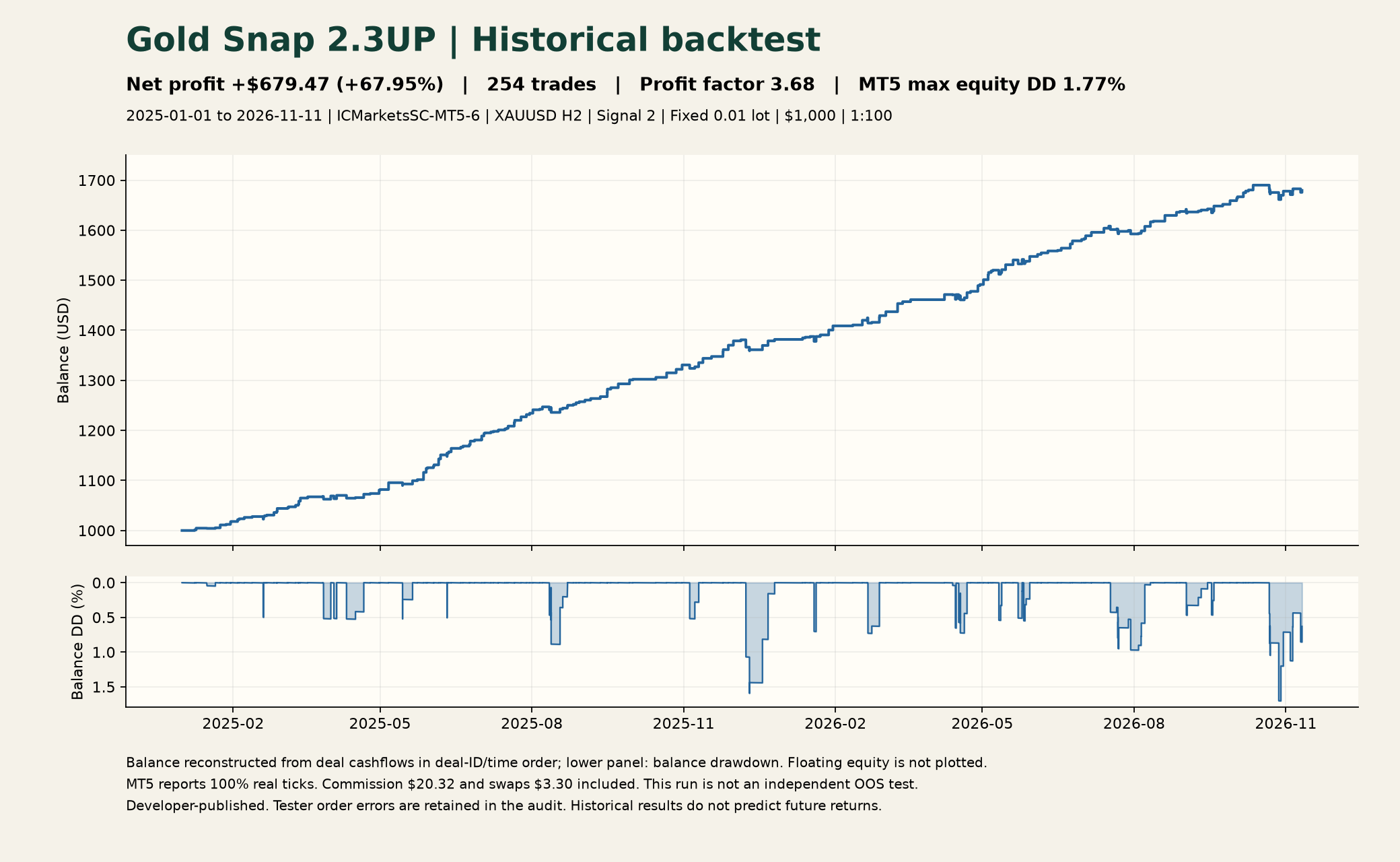
2.3UP: +67.95% in this historical test.

In a fixed-lot test of the archived 2.3UP build, USD 1,000 became USD 1,679.47 over 1 January 2025 to 11 November 2026 (end date exclusive). This historical simulation is separate from the live-account records above. The MQL5 Market listing shows version 2.3. We have not rerun this test on the current Market download.

Net return

+67.95%

USD 679.47 net profit on the initial USD 1,000, including recorded commission and swaps.

Maximal equity drawdown

1.77%

MT5 report figure for this fixed 0.01-lot run. Different sizing changes exposure and drawdown.

Profit factor

3.68

254 completed trades. A historical result, not an expected future return.

Gold Snap 2.3UP historical balance curve and balance drawdown, fixed 0.01 lot, January 2025 to November 2026
Balance reconstructed from realized deal cashflows in chronological deal-ID order. Floating equity is not plotted; the 1.77% equity-drawdown figure comes from the MT5 report. Open image for full size.
Test settings and limitations

Environment: ICMarketsSC-MT5-6 historical data, XAUUSD H2, Signal 2, fixed 0.01 lot, USD 1,000 initial deposit, leverage 1:100. MT5 reports 100% real ticks. Recorded commission: USD 20.32; swaps: USD 3.30. No additional deposits.

Preset: existing tester preset, not the product’s default risk-based sizing. Friday Protection and news filter were off. This run did not optimize parameters, but it is not an independent out-of-sample test. Results depend on data, settings and execution assumptions.

Audit note: the tester log includes rejected order modifications and orders; their impact has not been established. The exported deal table is not fully chronological, so the chart accumulates profit, commission and swap by deal ID, whose timestamps are chronological. The ending balance reconciles to the MT5 report.

Developer-published historical test, completed 11 November 2026. Backtests and live accounts use different conditions and must not be treated as interchangeable. Past performance does not predict future results.

WATCH THE EVIDENCE · 2 MIN 41 SEC

Live records and backtest, explained.

A short walkthrough of our public account records and the Gold Snap 2.3UP fixed-lot test. English narration, with English and Simplified Chinese subtitle tracks; data snapshot: 11 November 2026.

Open the dedicated video page ↗ · Watch the original YouTube edition ↗ · Developer-published video with synthetic narration.

Read the full video transcript

Gold Snap brings a focused gold breakout strategy to MetaTrader 5. Explore our public live trading record, then see the separate historical test of version 2.3UP.

As of 11 November 2026, the main live account showed cumulative growth of 206.96%, across 138 trades. Its maximal balance drawdown was 15.20%.

In a separate historical simulation, version 2.3UP turned a USD 1,000 starting balance into USD 1,679.47. The reported maximal equity drawdown was 1.77%.

That test recorded 254 trades and a profit factor of 3.68. This chart shows realized balance and balance drawdown. It does not plot floating equity.

The test used real ticks, a fixed 0.01 lot size, and the dates and broker conditions shown here. Commission and swaps were included. This is one historical run, not independent validation or the default risk-based preset.

Read the full records alongside these highlights. Account histories can span different versions and settings, and include losing periods. The three accounts had negative monthly growth at this snapshot. Historical results do not guarantee future returns.

Sizing changes risk exposure. Friday Protection and the news filter were off in this run. The tester also logged rejected orders and modifications. Review the full conditions and test with your own broker assumptions before deciding.

Bring gold breakout trading into your automated setup. Try Gold Snap’s free demo in the Strategy Tester. Visit TradingVisionX for the records and purchase link. Trading can lose capital.

On-screen test conditions: 1 January 2025 to 11 November 2026 (end exclusive), XAUUSD H2, Signal 2, fixed 0.01 lot, USD 1,000 deposit, 1:100 leverage, ICMarketsSC-MT5-6, real ticks. The live-account snapshot is dated 11 November 2026. Full report conditions · Original live records and recent performance.
02 / CHECK YOUR SETUP

Get ready for Gold Snap.

Read the current requirements

Confirm the supported account type, broker symbol, trading timeframe and recommended settings on the current MQL5 listing. Record the EA version and input preset you test.

Understand the protections

The published version 2.3 update refreshes three strategy presets and adds Friday Protection and an MT5 news filter. The news filter is skipped when calendar data is unavailable; it is not an unconditional news-risk shield.

Read the official release notes ↗

Test with your execution assumptions

Spreads, commission, slippage and broker conditions matter. Use representative historical periods and keep an untouched period for a separate check before drawing conclusions.

04 / TRY THE PROCESS

Try Gold Snap in MT5 — free.

STEP 1

Get the free demo

Open the Gold Snap listing and use the available free demo with MetaTrader 5’s Strategy Tester.

STEP 2

Compare conditions

Keep a record of dates, inputs, tick model, trading costs and drawdown. Compare more than a single profitable period.

STEP 3

Purchase on MQL5

Review the current price, license terms, activation allowance and setup instructions directly on MQL5 before purchasing.

Free demo = Strategy Tester only. MQL5 Market demo Expert Advisors cannot run on online charts, including demo-account charts. Read MetaTrader’s explanation.

Get the historical test inputs → Match the published 2.3UP test setup.

Read the gold EA testing guide →

Compare gold EA reports with our practical worksheet →

05 / BEFORE YOU BUY

Gold Snap questions, answered.

Is Gold Snap for MetaTrader 4 or MetaTrader 5?

The linked Gold Snap product is for MetaTrader 5 and focuses on XAUUSD / GOLD. Check your broker’s symbol naming and the current setup requirements before testing.

Is this an independent review or ranking?

No. TradingVisionX is associated with Gold Snap’s developer, Chen Jia Qi (walter2008). This is a product guide from the developer’s brand. The public author profile links to TradingVisionX.

Does no martingale mean low risk?

No. A strategy can lose money without using grid or martingale. Position sizing, market gaps, execution and changing conditions all affect risk.

Where can I find the latest price and version?

Use the official MQL5 product page. We link directly so you can check current details rather than rely on an old price snapshot.

Can I use Gold Snap with different accounts or on another computer?

Market activation is tied to the computer and operating system, not a single trading account. MetaQuotes permits use with different accounts and brokers on that activated computer; check Gold Snap’s symbol and setup requirements for each. A different computer or operating-system reinstall may require another activation. Review the activation allowance shown on MQL5 before buying. Removing the app does not restore used activations. See MetaQuotes activation guidance.

Are updates to my purchased EA free?

MetaQuotes states that updates to previously purchased Market products are free. Look in MT5’s Market → My Purchases for available updates. Save your settings before changing versions and retest your configuration. See the official update instructions.

How do I get the user guide and recommended settings?

The Gold Snap listing asks purchasers to contact the author through MQL5 to receive the user guide, recommended settings and installation instructions. Use your purchasing account and confirm the installed version and broker symbol. Our installation walkthrough helps you locate the purchased EA.

Does buying Gold Snap automatically copy the live signal account?

Gold Snap is an EA you configure in your own MT5 setup. Copying a provider’s trades uses a separate MQL5 Signals subscription. Buying the EA does not itself start signal copying. The live records linked here are evidence to explore; your version, settings, broker and execution may differ, so matching returns are not promised.

Purchase and platform information checked 12 November 2026. Confirm the current product details and Market terms on MQL5 before purchase.

How do I install Gold Snap after buying?

Follow our purchase and installation steps to find your purchased copy in MT5 and prepare your setup. The guide also covers what to check if your purchase is missing.

What should I check if Gold Snap is not trading?

Start with our four setup checks: confirm whether you are using the free tester demo or purchased EA, inspect the chart attachment and trading permissions, then review the relevant MT5 logs. Send the exact error text to support if the cause remains unclear.

How can I ask about my setup?

Email [email protected] with your platform, broker symbol and setup question. Never send trading-account passwords.

YOUR NEXT STEP

Make Gold Snap your next MT5 EA.

Get the free Strategy Tester demo, explore the current features and purchase Gold Snap securely through MQL5.

滚动至顶部